For dbt developers working in Microsoft Fabric
Keep the code-first approach. Go further in Fabric.
You already know the appeal of defining data models in code. Weaver takes that approach across more of Microsoft Fabric: Python data loading, Lakehouses, Warehouse SQL, native Power BI, testing and the work that connects them.
More of Fabric, less work joining the pieces
One project from source data to Power BI
Load files and APIs with Python, build Delta Tables in a Lakehouse, write T-SQL in a Warehouse, then deploy native Power BI models and Reports. Weaver connects the supported steps in the right order.
Keep your SQL looking like SQL
Write an ordinary Warehouse SELECT. Weaver creates the table and loading code around it, including staging, key-based updates and recorded row changes. Python and supported SQL references also help establish what depends on what.
Build first. Load when you're ready.
weaver build deploys tables, views, shortcuts and loading code. weaver load runs the data work separately. Preview proposed changes before applying them, or run only the parts you need.
Develop with the data already there
Mirror can use existing Warehouse and Lakehouse data through views and OneLake shortcuts. Make local changes to the parts you're working on without copying every table into development.
See beyond dbt job history
dbt shows job results and lineage. Weaver adds queryable Fabric Warehouse history and a Power BI dashboard for the Lakehouse, Warehouse and semantic-model work it manages, including ER diagrams and model bus matrices. See the difference →
Take native Power BI all the way to deployment
Use PBIP and TMDL, apply shared or model-specific rules, unit test DAX measures against independent SQL results, and deploy Reports connected to the right semantic model.
Build it. Load it. Test it. Know where it stands.
Deploying a table, loading its data and checking the results are separate steps. Run just the one you need. Here is the workflow for a Warehouse item:
weaver build --item Warehouse/Operations   # Deploy its definitions
weaver load Warehouse/Operations           # Run the data work
weaver test Warehouse/Operations           # Check the results
weaver health                              # Inspect the whole project
Beyond dbt lineage: see your Fabric estate in Power BI
dbt in Fabric already gives you job results, tests and model lineage. Weaver adds a different perspective: what is happening across the Fabric project it manages?
dbt in Fabric
Inspect dbt job runs, tests, compiled SQL and model dependencies. Detailed execution logs are stored in OneLake.
Weaver
Query deployment, load and test history in Fabric Warehouse tables. Open a ready-to-use Power BI dashboard covering managed Lakehouses, Warehouses and semantic models, including Health, performance and workflow timelines.
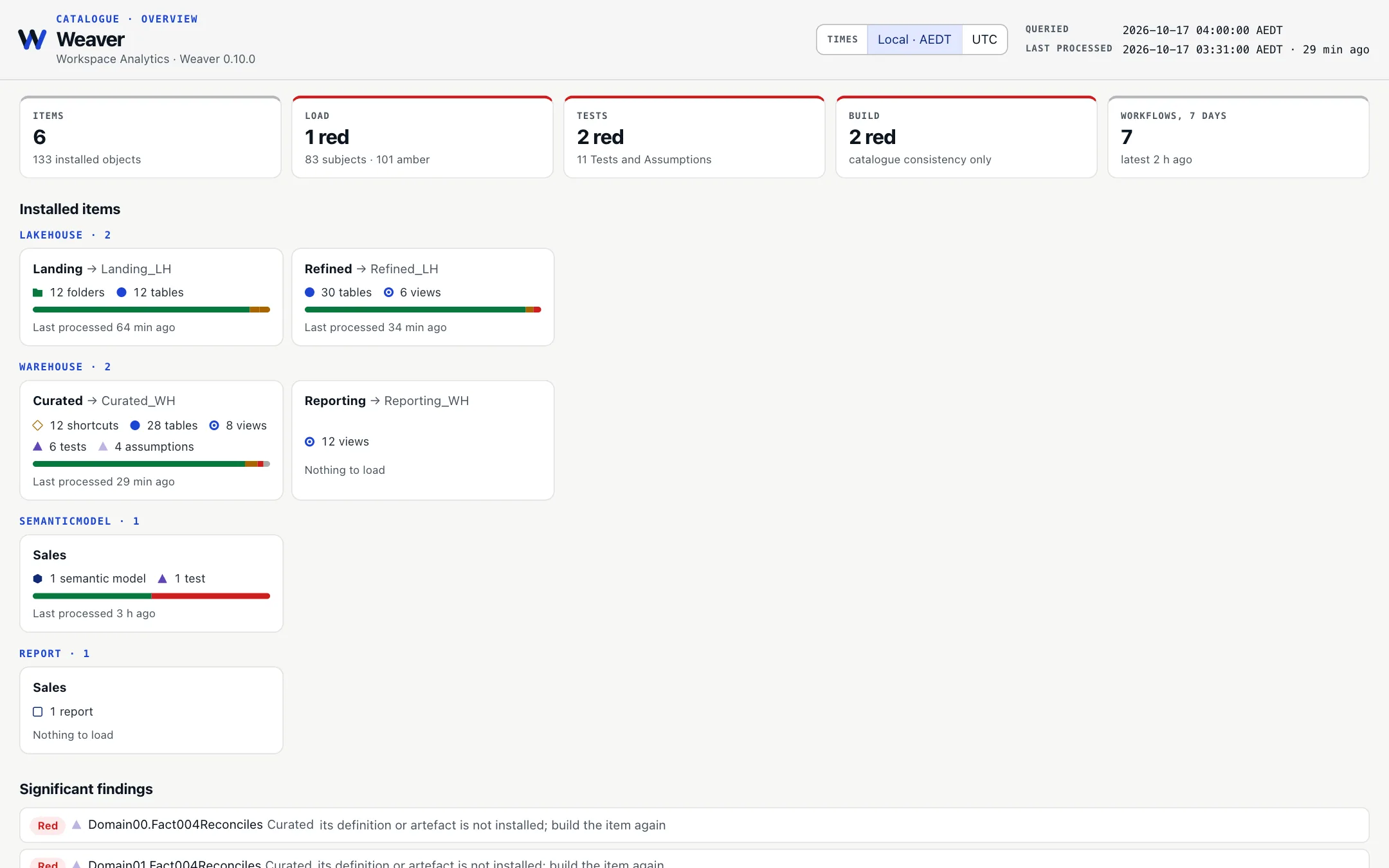
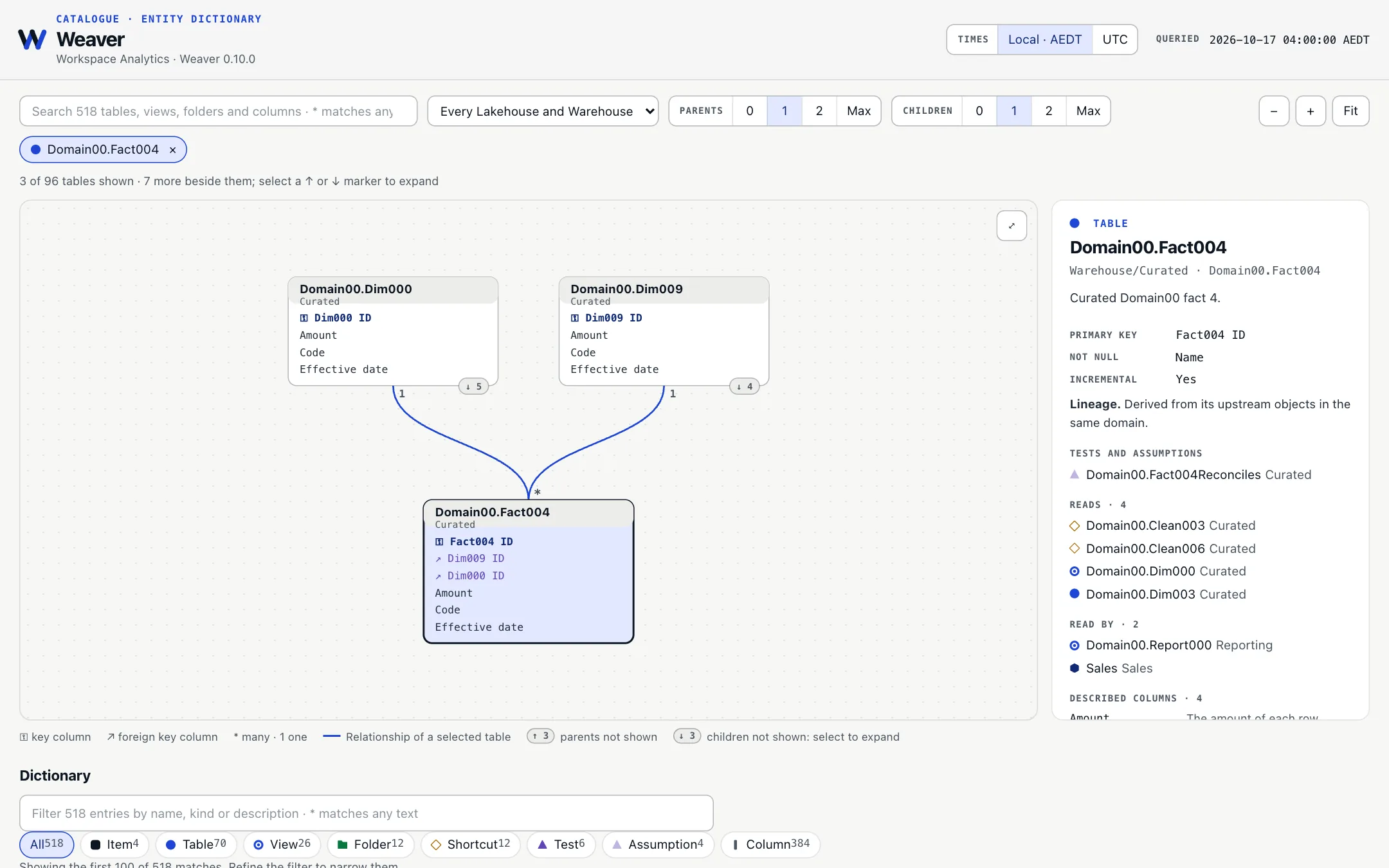
Lineage isn't the same as data modelling. dbt's lineage shows transformation dependencies. Weaver also shows declared primary-key and foreign-key relationships in an ER diagram, and fact-to-dimension relationships in a bus matrix for each native Power BI semantic model.
Try all seven interactive dashboard pages →Explore the semantic-model bus matrix →
The differences, side by side
This compares Weaver with dbt jobs and the Warehouse and Spark adapters in Fabric. dbt also offers additional Catalog and documentation features outside the Fabric job experience.
✓ included ◐ partial support ✕ not built into the adapter
| Capability | Weaver | dbt on Fabric |
|---|---|---|
| Fabric projects | ||
| Manage Lakehouse and Warehouse work in one project | ✓ | ✕ Warehouse and Spark use separate adapters and targets |
| Include Fabric shortcuts in the dependency graph | ✓ | ✕ not graph resources |
| Use the same project files in development and production | ✓ | ◐ targets and database configuration change relation locations |
| Develop using existing Fabric data without full copies | ✓ | ◐ table clone is documented within a Warehouse |
| Handle SQL endpoint refresh as part of cross-engine Load | ✓ Refresh metadata when required; SQL consumers wait for the endpoint to be ready | ✕ Fabric synchronises SQL metadata separately; dbt jobs do not manage this readiness step |
| Authoring | ||
| Write SQL without dependency macros | ✓ |
✕ dependencies use ref() and source()
|
| Recognise dependencies from Python imports | ✓ |
✕ Python models use dbt.ref()
|
| Python loaders for APIs, SFTP, archives and files | ✓ | ✕ Python models produce relations |
| Warehouse identity column declared with the table | ✓ | ✕ not provided as a model setting |
| Build and runs | ||
| Create tables and loading code without running a data load | ✓ | ✕ model materialisation creates and populates the relation |
| Query deployment, load and test state in Fabric Warehouse tables | ✓ Catalogue includes definitions, dependencies, outcomes and history | ◐ Fabric dbt jobs show run, test and lineage views; detailed logs and generated artifacts are in OneLake, not a comparable built-in SQL catalogue |
| Track where each table should resume loading | ✓ bookmarks | ◐ incremental models usually query the target |
| Assess current, stale, failed and blocked work together | ✓ Health combines installed definitions, loads and validations | ◐ Fabric dbt jobs show run and test outcomes; no equivalent cross-workload Health report |
| Keep unrelated work running after a failure | ✓ with fault-tolerant loading | ✓ descendants are skipped |
| Loading data | ||
| Support incremental changes from multiple sources, including inserts, updates and deletes | ✓ Custom Python or SQL chooses candidates and delete keys; Weaver handles staging, applying changes and per-consumer progress | ✓ Multi-source models, merge and delete strategies are available; exact behaviour depends on adapter and configuration |
| Reject invalid input rows and keep the reason | ✓ | ✕ no built-in rejected-row quarantine |
| Stop unexpectedly large data changes before applying them | ✓ | ✕ not a built-in model policy |
| Catalogue Dashboard and visual exploration | ||
| Deploy a Power BI dashboard for Health, performance, Gantt and orchestration | ✓ Ready to deploy over queryable Catalogue tables | ◐ Fabric dbt jobs show run, test and lineage views, not a bundled Power BI estate dashboard |
| Explore table relationships with an ER diagram | ✓ Uses declared Lakehouse and Warehouse primary/foreign keys | ◐ dbt provides lineage graphs; a key-based ER diagram is not a built-in Fabric dbt job view |
| See fact/dimension relationships in a Power BI model bus matrix | ✓ Shows semantic-model table relationships and their properties | ✕ Not provided as a built-in Fabric dbt job view |
| Power BI semantic models and Reports | ||
| Deploy native Power BI models and Reports | ✓ | ✕not part of dbt-fabric deployment |
| Apply shared Power BI rules and reuse models | ✓ | ✕dbt semantic models define its own metrics layer |
| Unit test DAX measures against SQL results | ✓ | ✕not a dbt-fabric validation target |
| Refresh Power BI models after source data loads | ✓ | ✕Power BI refresh is outside the adapter run |
 Weaver
Try it with one Fabric item
Start with a Warehouse query, a Lakehouse table or an existing Power BI model. Try Weaver on one part of your Fabric work, then add more when it's useful.
Build something small
Choose a Lakehouse, Warehouse or Power BI starting point and see Weaver at work.
Get startedExplore what else it can do
See change tracking, testing, environments, recovery, native Power BI and more.
Explore featuresThe Power BI comparison is about deploying and testing native PBIP/TMDL models and Reports. dbt's Power BI Semantic Layer integration is a different workflow.
Comparison sources: Fabric dbt job UI, OneLake job logs, SQL endpoint metadata sync, dbt incremental models, dbt-fabric changes, dbt-fabricspark and dbt Catalog.